Showing posts with label application. Show all posts

Monday, July 9, 2012

The Problem with Mobile (commentary)

       I love the mobile revolution! The software and devices coming out of Apple, Microsoft and Google & friends just makes my inner geek freak out with nerdy, geeky, techy joy! But there is a problem... Mobile is it is MOBILE! Prior to my jump into a tablet, my primary device of choice was a laptop. While not as mobile as a tablet, the laptop worked very nicely for my purposes. I had something like 6 hours of battery life and complementing programs that did what I needed. But the move to a tablet added a lot of things and I am mostly happy with it. But this article is not about what I am happy with. It's about what the mobile experience currently lacks.

True Multi-Tasking

I have played with all of the mobile operating systems that are currently available. From Blackberry to Symbian, from iOS to Android. What I haven't played with I have researched, and the one thing that is lacking in all of these devices is true multi-tasking. Sure some of them run programs in the back ground, but that isn't what I mean. What I refer to is the ability to work two tasks simultaneously without the need to switch between them. I am referring to windows people. OSX, Linux and Windows (which is named for the capability) all have it. I've worked on all three. Each has its advantages and disadvantages, but they all have the mutli-tasking ability I refer to. Now, I understand the limitations of multi-tasking at this level for mobile devices. First, the average phone's screen is way too small. But why should we preclude tablets from the game because phones have small screen space? Second, multi-tasking on such a level can cause a little larger strain on the mobile cpu and os. Still, I feel the primary reason that you can't find an iPad or Android tablet that has "windows" functions on it is laziness. 

The "Window" is Open

Of all the reasons listed above, laziness is the answer in my mind. I have seen that the window function is capable on mobile devices. A perfect example of this is MBFG's products. Things like OverSkreen (a floating web browser), StickIt! (a floating video player), AirCalc (a floating calculator) and AirTerm (a floating terminal). These apps all feature the window floating capability and play nice with other apps as well. What is more, Tablified Apps has released LilyPad Floating IM which does the same thing but for IM clients. Samsung also introduced something like stick it on the Galaxy S III phone. All of these apps can be resized, moved and minimized with little to not fuss. I have even used them on my small Android phone screen. While I am convinced that such a function is somewhat useless on such a small screen, I do feel the function should be available for those who would like to use it. And that is what MBFG does for Android. But that isn't enough! Just because there is some functionality in this area doesn't mean that it is the answer. Why isn't this basic function that has been available in computers since I can remember lacking in the computing devices of the future? Why can't I have a movie playing in one corner while I web browse on the other without having to modify my tablet? Why can't iPad users do this? Why is it that this basic functionality that we all use and take for granted on standard computers lacking in mobile? I would suggest it is because we are not asking for it. Right now, the only mobile tablet that may have this functionality built in is the Microsoft Surface. A device that isn't even released yet! From what I can tell, the Windows 8 & Windows RT maintain the floating windows function without much fuss. This means that Apple and Google could be playing catch-up to Microsoft if people realize that for the same or similar price to Microsoft's competition they can get a mobile device that is more functional. Now, I understand I could be way of base here. Maybe I'm making a big deal out of something everyone else could care less about. So what do you think. Is the floating window function a big deal?

Sunday, July 8, 2012

Run Android Apps on PC & Mac!

Blue Stacks is an app developed that allows users to run Android applications on a PC. That is old news. What is big news is that now Mac users can get in on the fun and games. This is a beauty of Android. Since it is open source by design Google has no problems with such things happening. In fact, by its very nature, Android is creating an ecosystem that is almost viral. If more and more users and utilize Android apps on more and more devices this makes the Android operating system more essential to more people. My hope is that Microsoft and Apple take a hint from this success by opening up such functionality in their mobile device applications. Sadly, while I can hope, I don't see such rational thinking happening on either software companies part. Still, the ability for an Android user to have their software they have spent good money on be transferable to the computer of their choice just adds further value. I can see someone using the Mircosoft Surface Tablet and running Blue Stacks and Android apps on it. Wonderful! To enjoy Blue Stacks for Mac, go here. To enjoy Blue Stacks for PC, go here.

Thursday, June 28, 2012

The Google Nexus 7!

Yesterday the Google Nexus 7 tablet was announced. This 7 inch tablet packs a massive one two punch. It starts at $200 for the base model ($250 for the next up) and packs the Nvidia Tegra 3 Quad Core +1 processor. The +1 is a fifth core that fans lovingly call Ninja core because it kicks in for low processing needs like web surfing or watching HD video to conserve on battery power. The tablet also boasts 1GB of ram, a super IPS display, a N wireless module and the latest iteration of Android called Jelly Bean. The manufacturer is ASUS and they have released 3 tablets prior to this. All three were great successes and were very well made. Additional all three are well supported as well. In fact, I'm writing this review on the ASUS Transformer Prime. But that's besides the point. This Nexus tablet is the first of its kind and will hopefully receive some tender love and care not only from ASUS but also from Google.


Why This is a Big Deal


This is the first time a high end tablet could be purchased at such a low price. Now some would suggest that the Kindle Fire or the Nook Tablet would both qualify for this prize, but this is not the case. Sure both had dual core processors on board which was top of the line at the time of release, but both run limited versions of a mobile operating system (Android) that are heavily customized so the user does not get a fully functional tablet without rooting the devices in questions. Not only is there some amount of specialized knowledge needed to do this, but by rooting the device you void the warranty. The Nexus 7 on the other hand not only delivers the high end quad core tablet with supporting hardware, but is also offers a fully functional mobile operating system.


My One Reservation


The one thing I do not see in the tablet that makes me frustrated is the lack of an expandable memory slot. There is no SD or microSD slot for which the user can add additional memory as needed. This is a must considering the base model comes with just 8GB of on board memory. The next model up offers 16GB of memory. The problem is that both versions the operating system takes up some of that memory. About 2.5GB is taken up by the OS. That is why I would recommend the 16GB model. Since the OS takes up the same amount of space on both the 16GB model actually delivers much more total memory available to you the user than the 8GB model does. Still, despite the lack of expandable memory slots, this tablet is still very much worth the money asked for it. Considering cloud storage will take up a lot of the slack, the memory issue isn't a huge deal.


Educational Potential


This little gem is perfect for schools. It has the right combination of price, size, and functionality. Admin, teachers, students and parents can all take advantage of a device that is portable, light and has a battery life that surpasses any laptop computer. The larger screen is bigger than a smart phone screen and offers the better functionality. For the same price of a high end smart phone under contract you get a tablet that does as much or more without the cost associated with a phone plan. Pare a bluetooth keyboard to Nexus 7 (or go without) and you have an extremely effective word processor. The research potential for students makes this an ideal device to have in or out of class. Then there is the things schools can eliminated with the introduction of the tablets. For example, rather than having very expensive and heavy textbooks the schools could use ebooks. Furthermore, the open source textbook option is an amazing and VERY low cost alternative to the traditional approach. What is more, this tablet is more than capable of providing such things as tutorial apps, interactive lessons, scientific and graphing calculators, charts and more for little to no cost. Every student could have a full set of references such as dictionaries and encyclopedias at hand too. Teachers could provide schedules and even update them so that all students and parents are aware of what is happening. Emergency notifications could be delivered to the tablets so students and teachers remain safe. Students can be called to the office or pulled out of calls without the need for the entire school to be disrupted by a general announcement that could also embrace the student in question. Essentially our schools could move out of the late 80's and into the 21st century. The best part is that the tablet or those that follow are the devices that can do this because of the low cost and high end combination.


                                                                                    Entertainment


The Nexus 7 has great potential as an entertainment devices in additional to its educational functions. The +1 on the Tegra 3 means you can browse the web and watch hours of HD footage while sipping away at battery life. Then is you want to kill some time while waiting with a game you can do that with access to hundreds of thousands of free and paid games. What is more, you aren't just limited to the Google Play store. There are other Android appstores such as Amazon and GetJar. You aren't limited in you music or video content either. If you are stuck in the Apple ecosystem you can simply port all your music and videos over at no cost since Android is compatible with many different media formats. If it isn't out of the box compatible for some of your content, there are apps that give the needed drivers to make them compatible at little to no cost. Then of course there are other options for music, audiobooks, ebooks and more. Why limit yourself to one ecosystem? I am the Kindle and Nook apps installed on my tablet and smartphone. I purchase the books I want at the best price. Same goes for music. It all centers in on my Android devices that are not limited in the least. Furthermore, if video content is your drive then you can access YouTube, Netflix, Amazon, HBO, Hulu and more. You can also bring your own digital files to the table without the need to convert them like other products such as Apple's. Back to the games thing, there are a large variety of casual and advanced games available through all appstores. Whether you want to kill a few minutes with Angry Birds or Cut the Rope, or if you want to spend more time with games such as Dead Space, Max Payne, Shadow Gun or Dark Meadows, you have plenty of options  on hand with a tablet that is built to handle the demands of them all!


Review to Come


So I'm taking one for the team here guys. I've pre-ordered the Nexus 7 16GB model and will be posting a full review as soon as I get my hot little hands on it. It is important to note that the current pre-order offer includes a bonus $25 credit for the Google Play store, so if you are interested in taking the dive without reviews that may be a nice little bonus for you. In either case, the wonders of the latest iteration of Android  combined with high end hardware is a nice temptation. I can't wait to see what other manufacturers will be offering to counter the Nexus 7. Either way, in the end guys we are the winners! I love living science fiction!

To purchase the Google Nexus 7 go to this link.

Update:

I missed this the first time, but the Nexus 7 also has a 12 core GPU (Graphics Processing Unit) that makes game play and over all beauty and usability of this tablet a pleasure. Essentially, this means that the tablet is running 16 cores when your playing games or other graphic intensive functions and still gives you 8 to 9 hours of battery life! If you are considering getting a Kindle Fire, think again. This tablet is the best bang for your buck. Especially the 16GB model.

Thursday, June 14, 2012

Dear Apple, Regarding iOS 6

I have heard you were saying your operating system is the "most advanced" mobile operating system, but I think you are mistaken. Let's go over the things added by iOS 6 and how they are old news for your top competitor, Android.

1) Facebook Integration

Well, you see, this particular functionality is available for Android. While currently the latest version of Android is 4.0, the most popular version in use is Android 2.3. Guess what guys, this feature and many others have been available since 2.0. So that nice little explanation about how iOS is better because it's not "fragmented" is negated. So in your Facebook Apple!

2) A new share screen.

See above. Nothing new here. In fact, the integration for the app or network of your choice is phenomenal.

3) Spotlight tweak, find apps easier because they can get hard to find on those different home screens

Well, with Android you can set any app to any home screen that you want. Rather than being dictated to by the all mighty Apple as to where you're app icons are, you can organize them as you wish. Add to that the fact that you can add widgets to you home screens and this iOS update is a huge snore fest! By the way, for those who are not aware of what a widget is. It is something that delivers information without the user needing to open up an application. Examples of these are weather, calender and reminders.

4) Reminders improvement

All of the features added with this update are already available through Android or through free applications such as Tasker or on(X). These apps also add automation, geofencing and more to Android without any problems.

5) Call rejection options. Reject with text message

These are called quick responses in Android. This has been available since Android 2.2.

6) New Siri functionality

You know. Siri is probably the only thing that really impresses me from iOS 5 or 6. It has improved. But the thing is that Siri is one of those things that I look at and think, "I'd use it a few times and forget about it." It's all shiny, no function for me. Here is why. The voice recognition function in Android kicks some serious but. A friend and I had a quick draw on dictating a text. My 1 1/2 year old Samsung Epic 4G against is iPhone 4S. I won. Each. And. Every. Time. In noisy environments. In quiet environments. Why do I need the voice recognition to talk back to me. I'm not Raj from the Big Bang Theory. I don't need to be deluded into thinking my phone is a person.

7) Cloud Tabs

The ability to open bookmarks from your computer on your phone... Wow! I wish someone else has thought of that! (Sarcasm) Seriously. OLD NEWS! You can do this with Chrome for Android, Firefox for Android, Dolphin and the default browser on Android.

8) Game Center Update

The ability to share your score with Game Center. Meh. I don't want to share my scores. Even if I did, most Android games have that ability built in. SNORE!


9) Photo Stream

Share photos through iCloud... Yah, Google Drive, Dropbox, Box.net and more. These guys have had this feature for a long time. I can share photos publicly or send personal links easily. Also, my Google Plus account auto backs up my pictures to a private folder which I can then make public at will.

10) Facetime on 3G

 Yah, I can do that with Skype, Tango, Ustream and ooVoo all have had this option available for a while. Oh, and these options aren't limit to just Apple products. You can communicate with anyone. These apps named are free and cross platform. I've been able to do this with my old Epic 4G since I've had it. That phone game running Android 2.1 and has since been updated to Android 2.3.3.


I am sure I missed some stuff, but I suppose my point is made. Android is currently the most advanced mobile OS that is currently on the market. This may not always be the case, but...


Clarification

Now don't get me wrong Apple (and Apple fans). I'm happy to see that you've added these functionalities so your users have a better experience, but please don't go acting like these things weren't "borrowed" from Android. Me personally, I love Android, but I am happy there are other options in the market. Competition makes the market better for consumers. But that's the sad thing Apple. You are using the courts around the world to try and kill competition. This pisses me off. Stick to innovation. You use to be good at it. If you can't keep up with the competition then do what RIM is doing, go away. But if you can delude yourself into think that the end user is better off with just iPhones in the market, you need to put down that weed you've been smoking and get clean.

Sincerely,

Not Impressed


P.S.

This youtube review, Wicked4u2c does a great break down on Android for you to see how these feature are really old news for Android. This reviewer is amazing. I suggest you follow him.


Wednesday, June 13, 2012

The Pocket TV: Mobile Has Just Gotten Cooler

Android Ice Cream Sandwich on my TV? Yes please!!!
Some projects on Kickstarter are just cool. Others are freaking AWSOME! The Pocket TV just so happens to be one of the latter. Running Android 4.0 (Ice Cream Sandwich) this USB thumb drive sized computer turns your display of choice into a fully functional entertainment and presentation system without anything other than the device and remote. So long as the display in question has a HDMI-in, you are cooking with jet fuel baby! Plug and play. In my geeky little mind this is a massive plus because I have an Android 4.0 tablet. The customization of this micro computer is ideal. I also have a Logitech Revue Google TV box, and I'll be honest, I'm replacing it with the Pocket TV. Google's biggest mistake with the Google TV is, in my mind, that they didn't just make it Android for TV. This is that in a nut shell.


 First Impressions


The specs for the device seem a little on the low side when you first look at them. A 1 GHz processor is a little on the low side, but considering the 1080p dedicated GPU makes it all better. The majority of processing needs for games and movies comes from the graphics. It helps that Ice Cream Sandwich is the best and most effective version of Android yet.


Mobile Gaming but Better!

Speaking of games! The Pocket TV comes with a USB port on the back! A lot of Android games are coming with controller options now so you can have a mobile gaming platform on your hands. And I'm not talking about Angry Birds or Cut the Rope either. Games like ShadowGun, Asphalt and more. Then of course there are the countless emulators out there for older games going from the PlayStation and the Nintendo 64 and back. I'm sure PS2 and Xbox emulators aren't that far off either.

The Project

The Kickstater Project is fully funded, so if you jump on board it isn't because you have a dying desire to help this project float. No my friend, there is no altruistic excuse for your to drop so dough here, this is all about you. The projected availiabiltiy of the Pocket TV will be October, so you are investing in the future, but consider how jealous your family, friends and co-workers will be when you show them your new toy this Thanksgiving and Christmas season. If you are in the US or Canada, you're looking ad dropping $120 (includes shipping) for the pocket TV with basic remote. If you want the Air Remote, your total will be $145 including shipping. That's not bad considering that the retail price is $190 AND your get it before your snobby relative who always lords it over you that he or she has the latest and greatest first. If you are that snobby relative, well... you spent less for the latest and greatest then. To check out the project and more details, click this link.

P.S. You can also control the Pocket TV from your Android or iPhone. Just another reason to love this idea!


Elphi Smart Plug: Life at Your Fingertips


This smart plug allows you to control your appliances from a distance. Consider this the natural evolution of the clap-on clap-off device. Using your Android or iPhone you can monitor and control power going to electronics in your home. Set devices on timers or control them at will with ease. It also has power monitoring abilities. This is great for energy conservation minded folks. But the thing is, this project needs your help. For $89 or more pledge you get in on a device that will become common place in the near future. The higher amounts you pledge the more plugs you get. Check out the project. As of the writing of this post there is 15 days left to the project and they haven't made goal yet. Join the Kickstarter project to make this dream a reality!

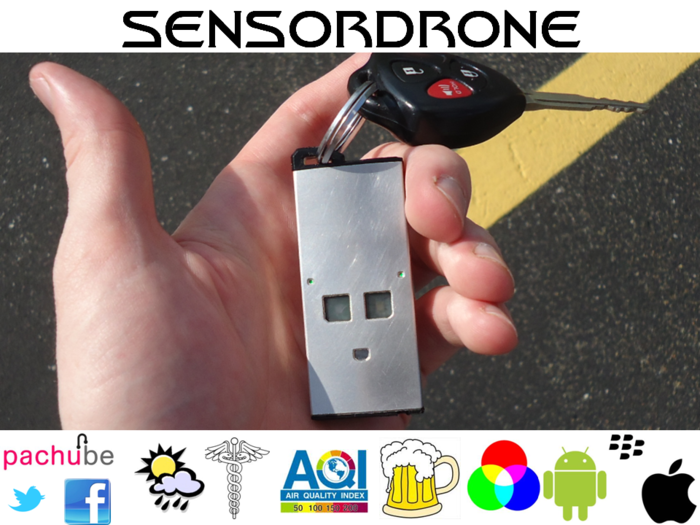
SensorDrone: A Make Your Phone Do More


The advent of the smart phone has done a lot. Starting with IBM, the smart phone has evolved into micro computers that can do more, faster than devices of the past. 


 Enter the SensorDrone. This little jewel makes it so you can measure things your phone would not be able to on its own. For $175, you can jump on board for a device that allows you to measure 


Be it Android or iPhone, if the application is enabled to connect to the SensorDrone then you can use it.


The device has an air, temperature and light sensor built into it. Additionally, there is an expansion post built into it. 


If you are interested in getting a sensor like this, you can get this device for just $175. When this hits the retail stores, you'll pay $199 for it. Click here to join the Kickstarter project.